
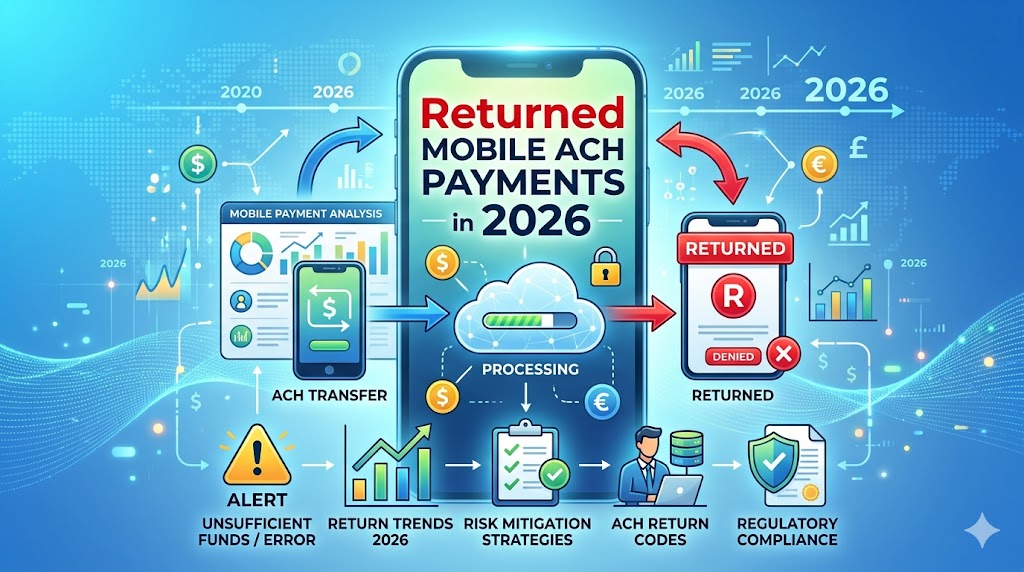
What Exactly is an ACH Payment?
Right then, let’s dive into the nitty-gritty of mobile ACH payments. We’ve all probably used our phones to send money, right? Whether it’s splitting a dinner bill with mates or paying for that last-minute online purchase, it’s become second nature. But lurking beneath the surface of these slick, app-driven transactions is a system known as ACH – the Automated Clearing House. Think of it as the unsung hero, the plumbing, if you will, that quietly moves money from one bank account to another across the country. It’s not as flashy as a credit card swipe, but it’s incredibly efficient and widely used for everything from direct deposits of your salary to paying your utility bills.
The Mechanics of ACH Transfers
So, how does it all work, you ask? When you initiate an ACH transfer, usually through a banking app or a payment service, you’re essentially giving your bank the green light to move funds. This instruction then travels through a secure network to the recipient’s bank. It’s not instantaneous like some instant payment systems, but it’s reliable and cost-effective. ACH payments are batched and processed at specific times during the business day, which is why they might take a day or two to clear, unlike some of the speedier real-time payment options gaining traction. It’s a robust system designed for high-volume transactions, and it’s the backbone of a lot of modern financial activity.
When Mobile ACH Payments Go Wrong: The “Returned” Status
Now, the topic at hand: what happens when these mobile ACH payments decide to go on strike and get “returned”? A returned ACH payment, often referred to as a “bounced” payment (though that term is more commonly associated with cheques), means the transaction failed to go through successfully. It’s like trying to send a letter, only for the postman to bring it back because the address was wrong or the recipient had moved. This can be a real headache for both the person sending the money and the person expecting it. It disrupts the flow of funds and can lead to a cascade of other issues.
Common Reasons for Returned Mobile ACH Payments
There are quite a few reasons why your carefully initiated mobile ACH payment might come back to sender. It’s rarely a single culprit, but rather a combination of factors that can lead to a failed transaction. Let’s break down some of the most frequent offenders:
Insufficient Funds (NSF)
This is probably the most common culprit, and it’s pretty self-explanatory. If there isn’t enough money in your bank account to cover the payment you’re trying to make, the bank will simply reject it. It’s like trying to buy something with a card that’s over its limit – the transaction is declined. Some banks might even charge you an overdraft fee for attempting to spend money you don’t have, which is a double whammy.
Invalid Account or Routing Numbers
Mistakes happen, especially when you’re typing in your bank details on a small phone screen. If the account number or the routing number you’ve provided is incorrect, the ACH network won’t be able to locate the intended destination for the funds. It’s like giving someone the wrong postcode for a delivery; the package will never reach its intended recipient. Always double-check these numbers!
Account Closed or Frozen
Perhaps the account you’re trying to send money to, or the account the money is coming from, is no longer active. If an account has been closed by the customer or the bank, or if it’s been frozen due to legal reasons or suspicious activity, any ACH transactions attempting to use it will be returned.
Authorization Issues
Sometimes, the payment might be returned because the necessary authorization wasn’t properly obtained or verified. This can happen if a merchant is trying to initiate a payment without explicit consent, or if there’s a discrepancy in the authorization process itself. Banks have strict rules to prevent unauthorised transactions, and they’ll flag anything that looks suspicious.
Technical Glitches and Processing Errors
While the ACH system is generally robust, it’s not entirely immune to hiccups. Occasionally, a payment might be returned due to a temporary technical issue at either the sending or receiving bank, or within the ACH network itself. These are usually isolated incidents, but they can still cause inconvenience.
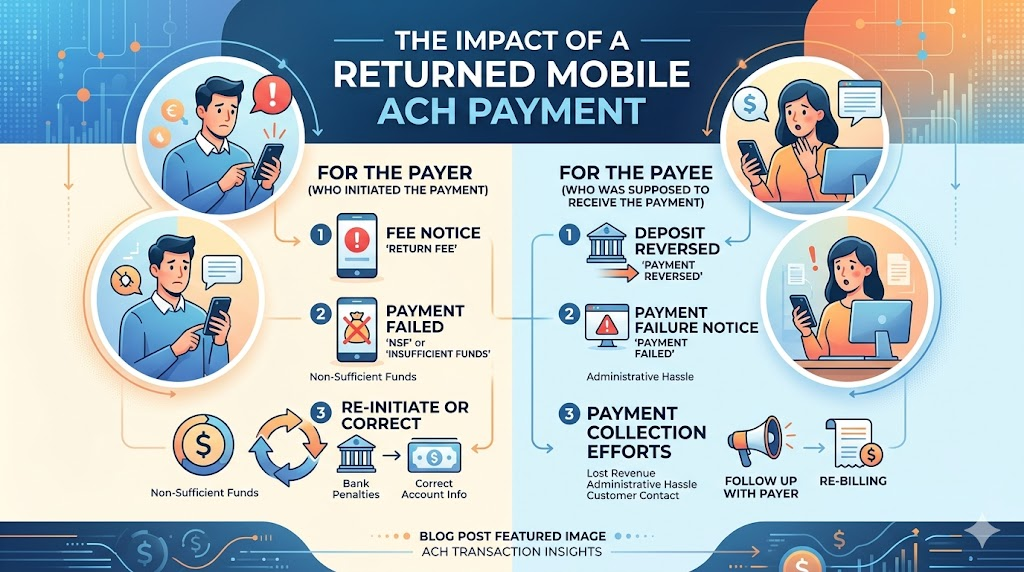
The Impact of a Returned Mobile ACH Payment
A returned payment isn’t just a minor inconvenience; it can have tangible consequences for everyone involved. It’s like a ripple in a pond, spreading outwards and affecting more than just the initial splash.
For the Payer (Who Initiated the Payment)
If you’re the one who sent the payment and it’s returned, you might face a few unpleasant outcomes. Firstly, there’s the potential for fees from your bank, especially if it was due to insufficient funds. Secondly, if you were paying a bill, you’ll now be considered late on that payment, which could lead to late fees from the payee and potentially impact your credit score. And let’s not forget the embarrassment or inconvenience of having to re-initiate the payment, often with a slightly panicked feeling.
For the Payee (Who Was Supposed to Receive the Payment)
For the business or individual waiting to receive the funds, a returned payment means they haven’t received the money they were expecting. This can be particularly problematic for businesses that rely on timely payments for cash flow. They might have to chase the payer for the funds, potentially incur their own bank fees, and deal with the administrative hassle of processing the returned transaction and re-attempting the collection. It’s a disruption to their financial operations.
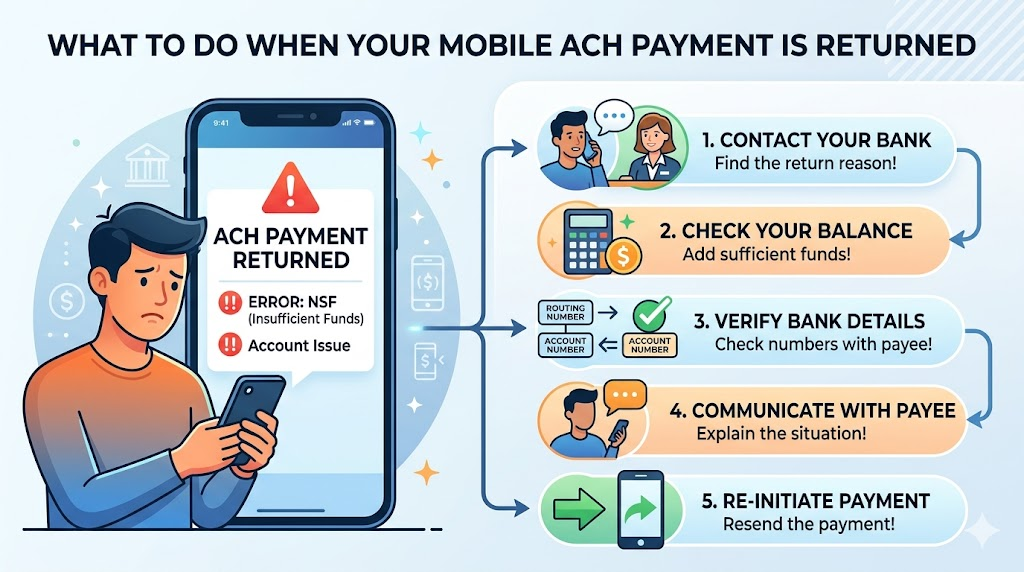
What to Do When Your Mobile ACH Payment is Returned
So, you’ve just received that dreaded notification: your mobile ACH payment has been returned. Don’t panic! Here’s a step-by-step guide to help you navigate this tricky situation.
Steps for the Payer
- Contact Your Bank: First and foremost, get in touch with your bank to understand the exact reason for the return. They can clarify if it was NSF, an account issue, or something else entirely.
- Review Your Account Balance: If it was NSF, ensure you deposit sufficient funds to cover the payment and any potential fees.
- Verify Bank Details: If you suspect an error in the account or routing numbers, double-check these with the payee and be extremely careful when re-entering them.
- Communicate with the Payee: Immediately inform the person or business you were trying to pay about the returned transaction. Explain the situation and let them know your plan to rectify it.
- Re-initiate the Payment: Once the issue is resolved (sufficient funds, correct details), try sending the payment again. It’s often best to wait a business day to ensure all previous attempts have fully cleared your account.
Steps for the Payee
- Notify the Payer: As soon as you’re aware of the returned payment, contact the payer. This allows them to address the issue promptly.
- Understand the Reason: Ask your bank or payment processor for the specific reason code for the return. This will help you guide the payer on how to fix it.
- Review Your Information: Ensure your own bank account and routing numbers are correctly on file with the payer.
- Consider Alternative Payment Methods: While you wait for the ACH to be re-processed, you might want to discuss other payment options with the payer to avoid further delays.
- Update Your Records: Log the returned payment and any associated fees in your accounting system.
Preventing Future Returned Mobile ACH Payments
Nobody wants a repeat of a returned payment scenario. It’s all about being proactive and setting yourself up for smooth sailing.
Tips for Payer Peace of Mind
- Maintain a Buffer: Always try to keep a little extra money in your bank account, beyond what you need for immediate expenses. This buffer can prevent accidental NSF returns.
- Regularly Check Balances: Make it a habit to check your account balance regularly through your mobile banking app. Knowledge is power, after all!
- Double-Check Details: Before hitting send on any payment, take that extra second to verify all account and routing numbers. It’s a small effort that saves a lot of trouble.
- Link Verified Accounts: If you’re using a third-party payment app, ensure you’ve linked your bank account correctly and that it’s been verified.
Best Practices for Merchants and Businesses
- Securely Store Payment Information: Use trusted and secure platforms to store customer bank details, if applicable.
- Implement Verification Processes: Utilize services that help verify account and routing numbers before attempting to process payments.
- Clear Communication: Have clear terms and conditions regarding payments, including what happens in case of returns.
- Regularly Reconcile Accounts: Keep a close eye on your bank statements and payment processor reports to quickly identify any returned transactions.
Understanding Fees and Penalties
It’s worth noting that returned ACH payments can come with a price tag. Your bank might charge you an NSF fee or a returned item fee. Similarly, if you’re a business, your merchant account provider might also levy charges for returned transactions. These fees can add up, so understanding your bank’s fee structure and your payment processor’s terms is crucial. It’s another good reason to prevent returns in the first place!
The Role of Your Financial Institution
Your bank or credit union plays a pivotal role in the ACH process. They are responsible for verifying your account details, processing outgoing and incoming transactions, and flagging any issues. When a payment is returned, your financial institution will be the first point of contact to help you understand why and what steps you need to take. Building a good relationship with your bank can make navigating these situations much smoother.
Navigating the Future of Mobile Payments
The world of mobile payments is constantly evolving. While ACH remains a cornerstone, we’re seeing a rise in real-time payment networks and other innovative solutions. However, the fundamental principles of ensuring sufficient funds, accurate details, and proper authorization will continue to be paramount, regardless of the underlying technology. Understanding how these systems work, including potential pitfalls like returned payments, empowers you to use them confidently and efficiently.
Conclusion: Mastering Mobile ACH Transactions
Returned mobile ACH payments can feel like a unwelcome roadblock in our increasingly digital financial lives. However, by understanding the mechanics of ACH, recognizing the common reasons for returns, and knowing the steps to take when they occur, you can transform a potentially frustrating experience into a manageable one. Proactive measures, clear communication, and diligent checking of details are your best allies in ensuring your mobile payments flow smoothly, keeping your finances in check and your transactions on track.
Frequently Asked Questions (FAQs)
1. How long does it typically take for a returned mobile ACH payment to be reflected in my account?
The time it takes for a returned ACH payment to be reflected can vary, but it’s usually within 1 to 3 business days. This includes the time for the initial transaction to fail, the notification to be sent back through the ACH network, and for your bank to update your account balance and records.
2. Can a returned ACH payment affect my credit score?
A single returned ACH payment is unlikely to directly impact your credit score. However, if the returned payment was for a bill or loan installment, and you fail to pay it promptly, the payee might report the delinquency to credit bureaus, which can negatively affect your score. Also, repeated overdrafts due to NSF can sometimes be noted by banks and might indirectly influence future credit applications.
3. What’s the difference between a returned ACH payment and a payment dispute?
A returned ACH payment typically occurs due to technical reasons, insufficient funds, or incorrect information, meaning the transaction simply failed. A payment dispute, on the other hand, is when the account holder claims an unauthorized or incorrect transaction was made, and they actively challenge it with their bank.
4. If a payment is returned due to NSF, can the payee try to debit my account again?
Yes, generally the payee can attempt to re-initiate the ACH debit. However, they are usually required to notify you of their intention to do so and may have limits on how many times they can attempt the debit. It’s best to resolve the underlying issue (like insufficient funds) before they try again to avoid further fees.
5. Are there any ways to avoid bank fees associated with returned ACH payments?
The best way to avoid fees is to prevent the return in the first place! Always ensure you have sufficient funds, double-check all bank details, and maintain a small buffer in your account. If you do encounter a returned payment, contacting your bank promptly to explain the situation might sometimes lead to a fee waiver, especially if it’s a first-time occurrence or you have a good banking history.
Pingback: How to Add Chainlink and Solana to Your PayPal and Venmo Accounts for Crypto Transactions ?
Pingback: The Impact of AI and Machine Learning on Fintech Software Development
Pingback: Mobile ACH Payments vs Credit Cards: Which Is Better?