
The Shift in Figma’s AI Strategy: From Free to Paid Credits
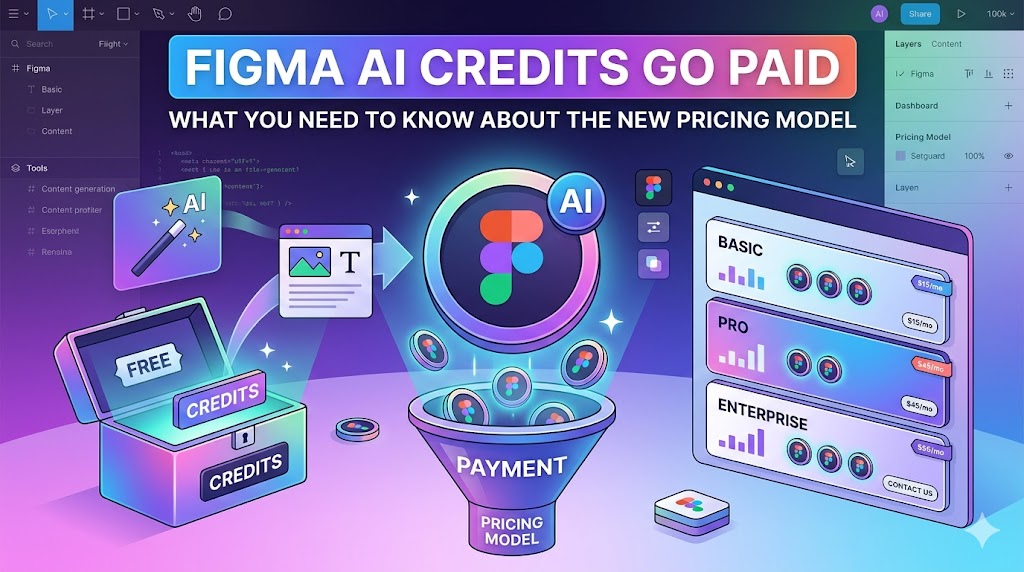
Alright, let’s talk about Figma AI Credits pretty significant change that’s been buzzing around the design community: Figma’s AI features are no longer completely free. If you’re a regular Figma user, especially one who’s been dabbling with their AI-powered tools, you’ve probably noticed this shift. It’s like finding out your favorite free coffee shop now charges for refills – a bit of a surprise, right? Figma, a platform that revolutionized collaborative design, is now implementing a credit system for its advanced AI functionalities. This isn’t just a minor tweak; it signifies a strategic move by Figma to monetize these powerful features, and it’s something we all need to get a handle on.
Understanding the “Why”: Figma’s Rationale Behind the Change
So, why the sudden change from a generous free offering to a paid credit model? Figma, like any ambitious tech company, invests heavily in research and development. These AI features aren’t just pulled out of thin air; they require significant computational resources, ongoing development, and a dedicated team of engineers and AI specialists. Think of it like building and maintaining a state-of-the-art laboratory – it’s not cheap! By introducing a credit system, Figma aims to balance the cost of providing these advanced tools with the revenue needed to sustain and improve them. It’s their way of ensuring that these AI capabilities can continue to evolve and become even more sophisticated, while also being fair to those who leverage them most. This move allows them to offer these cutting-edge features without compromising the core accessibility of their design platform.
What Are Figma AI Credits Exactly?
Let’s break down what these “Figma AI Credits” actually are. In essence, they’re a form of virtual currency that you’ll use to access and power specific AI features within Figma. Instead of paying a separate subscription for each AI tool, you purchase credits in batches. When you use an AI feature – say, to generate design elements, refactor code, or even summarize design feedback – a certain number of credits will be deducted from your account. It’s a consumption-based model, meaning you pay for what you use. This system is designed to be flexible, allowing users to scale their AI usage according to their needs.
Key AI Features Affected by Credits
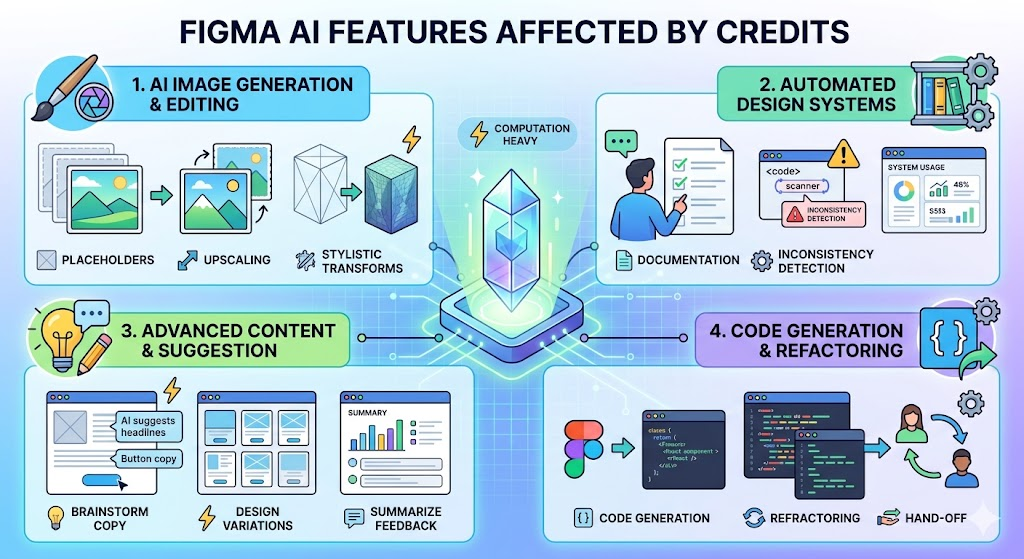
The introduction of credits primarily impacts features that leverage advanced AI processing. While Figma hasn’t laid out an exhaustive list that will never be free, the current focus is on functionalities that are computationally intensive. This typically includes things like:
- AI-powered image generation and editing: Think generating placeholder images, upscaling low-resolution assets, or even applying stylistic transformations based on AI understanding.
- Automated design system documentation and analysis: Tools that can scan your design system, identify inconsistencies, or automatically generate documentation can be credit-heavy.
- Advanced content generation and suggestion: Features that help brainstorm copy, suggest design variations, or even summarize user feedback.
- Code generation and refactoring: For teams that use Figma for design-to-code workflows, AI assistance in this area will likely consume credits.
The exact features and their credit costs can vary, so it’s always a good idea to check Figma’s official documentation for the most up-to-date information.
Navigating the New Credit System: How It Works
Understanding how to acquire and use these credits is crucial to avoid any workflow disruptions. Figma has structured this system to be relatively straightforward, aiming for minimal friction.
Credit Allocation and Purchasing Options
When the credit system rolls out, you’ll likely see a few different ways to get your hands on credits. For individual users and smaller teams, there will probably be options to purchase credits as needed. Think of it like topping up your phone’s data plan. For larger organizations and enterprise clients, Figma might offer bundled credit packages as part of their subscription tiers or as add-ons. These larger packages often come with a better per-credit rate, rewarding higher usage. You’ll typically manage your credit balance through your Figma account settings, where you can see your current balance, track your consumption, and make purchases.
Free vs. Paid Tiers: What’s Included?
It’s important to understand that not all AI features might fall under the paid credit system immediately, or they might have a limited free tier. Figma is likely to retain some basic AI functionalities or offer a small monthly allotment of free credits to all users. This ensures that even those on free plans can experience some of the AI magic. However, for advanced use, deeper integration, or higher volumes of AI-powered tasks, you’ll definitely need to dip into your purchased credits. The specific breakdown of what’s free and what requires credits will be detailed in Figma’s updated pricing and feature pages.
Understanding Credit Consumption
How many credits does an action consume? This is the million-dollar question, or perhaps, the few-cents-per-action question! Figma will publish clear guidelines on how many credits each AI feature uses. This consumption rate can vary based on the complexity of the task. For instance, generating a simple icon might cost less than generating a complex illustration. Similarly, a quick code snippet might use fewer credits than a full page of refactored code. The key is to be mindful of the credit cost associated with the AI features you use most frequently. If you’re running a large campaign with extensive AI-assisted image generation, for example, your credit consumption will naturally be higher than someone using AI for occasional text suggestions.
Impact on Team Workflows and Collaboration
This shift can definitely have an impact on how teams collaborate. If your team relies heavily on AI features for efficiency, you’ll need to budget for these credits. It might mean having a dedicated team member or administrator manage the credit pool, ensuring everyone has access when needed. Communication within the team becomes even more vital. You’ll want to discuss which AI features are most valuable and how to use them judiciously to maximize the impact of your credit budget. It’s a good opportunity to re-evaluate your workflows and identify areas where AI truly shines and where traditional methods might still suffice, especially if credit costs are a concern.
Cost Analysis: Is Figma AI Still Worth It?
This is the big question on everyone’s mind. With credits costing real money, how do you determine if it’s still a worthwhile investment? It boils down to your specific needs and how much value you derive from these AI tools.
Comparing Credit Costs Across Different Usage Scenarios
Figma will likely offer different credit packages, with bulk purchases providing a lower per-credit cost. This means a small startup using AI features sparingly might find it more economical to buy smaller credit packs as needed. Conversely, a large agency handling numerous projects with high AI utilization will benefit significantly from larger, more cost-effective credit bundles. The key is to analyze your current and projected usage patterns. Are you using AI to shave hours off design tasks? To unlock creative possibilities you wouldn’t have otherwise? If the time saved or the creative output generated outweighs the cost of the credits, then it’s likely still a valuable proposition.
Calculating Your Potential Spend: A Practical Approach
To get a realistic estimate of your potential spend, you’ll need to do a bit of homework. First, identify the AI features you use most frequently. Then, check Figma’s documentation for the credit cost of each feature. Estimate how many times you use each feature per week or per month. Multiply your usage by the credit cost, and then by the price per credit within the purchasing tier that best suits you. This will give you a rough monthly or annual expenditure.
Example Scenarios: From Small Teams to Large Agencies
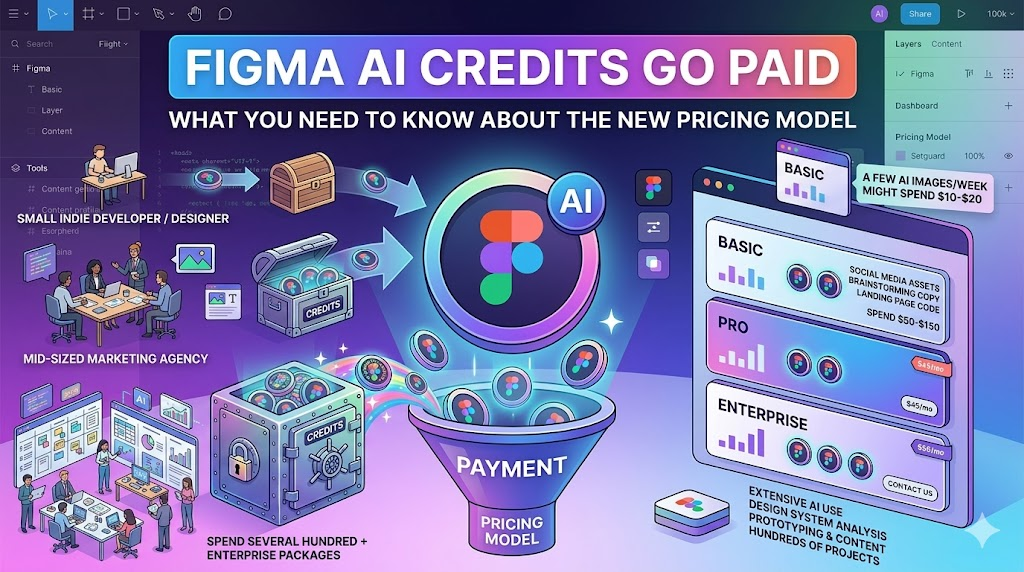
Let’s paint a picture:
- Small Indie Developer/Designer: Uses AI image generation a few times a week for concept art. Might spend $10-$20 a month on credits.
- Mid-sized Marketing Agency: Utilizes AI for generating social media assets, brainstorming copy variations, and assisting with code snippets for landing pages. Their spend could range from $50-$150 per month, depending on project volume.
- Large Enterprise Design Team: Leverages AI extensively for design system analysis, rapid prototyping, content generation, and complex image manipulations across hundreds of projects. Their monthly spend could easily be several hundred dollars, making them prime candidates for enterprise-level credit packages.
The “worth” is entirely relative to the efficiency gains and enhanced creative output you achieve.
Maximizing Your Figma AI Credits: Tips and Strategies
So, you’re ready to embrace the credit system but want to make every credit count? Smart move! Here are some ways to optimize your AI usage.
Efficient Use of AI Features to Save Credits
The first rule of maximizing credits is to be intentional. Before hitting the “generate” button, ask yourself:
- Is this the most efficient AI feature for the task? Sometimes, a simpler AI function might suffice and cost fewer credits.
- Can I refine my prompt for better results? The more precise your input, the fewer iterations you’ll likely need, saving credits.
- Am I using AI for tasks that are already quick for me? If a task takes you less than 5 minutes manually, it might not be worth using credits on AI automation.
- Leverage batch processing (if available): If Figma allows you to apply an AI function to multiple elements at once, it can be more credit-efficient than doing them one by one.
Also, keep an eye on any free credit allocations Figma might provide monthly. Use these for quick, experimental tasks or features you don’t use often.
Exploring Alternative Tools and Workarounds (If Necessary)
While Figma’s integrated AI is powerful, it’s always good to have a backup plan. If certain AI features become prohibitively expensive for your specific workflow, consider if there are alternative tools that offer similar functionality, perhaps with a different pricing model or even free options. For instance, there are dedicated AI image generators or AI writing assistants outside of Figma that might offer more competitive pricing for specific tasks. You could also explore if certain design tasks that were previously AI-assisted can be streamlined through more efficient manual processes or by using plugins that don’t rely on AI credits. It’s about finding the right balance for your budget and needs.
The Future of AI in Figma and Beyond
This move to paid credits is likely just the beginning of Figma’s AI journey.
Anticipating Further AI Integrations and Their Pricing
As AI technology advances, we can expect Figma to integrate even more sophisticated AI capabilities into its platform. This could include more advanced predictive design suggestions, deeper user behavior analysis integration, or even AI that can proactively identify and fix design flaws before they’re even noticed. Each new, powerful feature will likely come with its own credit cost or be integrated into the existing credit ecosystem. It’s a dynamic landscape, so staying informed about Figma’s product roadmap will be key.
Industry Trends: The Broader Context of AI Monetization
Figma’s move isn’t an isolated event; it reflects a broader trend in the software industry. As AI becomes more integrated into everyday tools, companies are exploring various monetization strategies. This includes subscription add-ons, usage-based pricing (like Figma’s credits), and tiered feature access. The underlying principle is that advanced AI capabilities require significant investment, and companies need to find sustainable ways to fund their development and deployment. We’re seeing this across creative software, productivity tools, and even customer service platforms.
Conclusion: Adapting to the New Era of Figma AI
The transition to paid AI credits in Figma marks a new chapter for the platform and its users. While it requires a shift in how we approach and budget for AI-powered design, it also signifies Figma’s commitment to developing and refining these powerful tools. By understanding the credit system, calculating potential costs, and employing smart strategies for efficient usage, designers and teams can continue to harness the benefits of AI without breaking the bank. It’s about adapting to a new model, embracing the value AI brings, and ensuring our workflows remain both innovative and cost-effective. The future of design is increasingly intertwined with AI, and learning to navigate these evolving pricing models is a crucial skill for any modern creative professional.
Frequently Asked Questions (FAQs)
1. How many credits do I get for free each month?
Figma is expected to offer a certain number of free credits or provide free access to basic AI functionalities. The exact amount and scope of free offerings will be detailed in their official pricing information. It’s best to check Figma’s website for the most current details.
2. Can I set a budget for AI credit usage for my team?
Yes, Figma typically provides administrative tools for team accounts that allow managers or account owners to monitor credit consumption, set spending limits, and manage credit purchases, ensuring better budget control.
3. What happens if I run out of credits mid-project?
If you exhaust your credits, the AI features that require them will likely become temporarily unavailable until you purchase more credits. It’s advisable to monitor your credit balance closely, especially when working on time-sensitive projects.
4. Are AI credit costs subject to change?
Like most software pricing, Figma’s credit costs could potentially change over time as they update their features, infrastructure, and market strategies. Figma usually provides advance notice for significant pricing adjustments.
5. Is there a way to get discounted credits?
Figma often offers discounts for purchasing larger credit bundles. Additionally, enterprise plans or long-term commitments might come with more favorable per-credit pricing. Staying updated on their offers and plan structures can help you find the best value.
Pingback: Cursor AI Latest Updates 2026: Revolutionizing Your Coding Workflow
Pingback: How AI Outbound Calling Agents Boost Sales Efficiency: Unlocking Success
Pingback: How to Get Free Figma AI Credits Right in 2026 ?