

Unlocking Your Creative Potential: A Deep Dive into How to Use Yodayo AI
Ever felt that spark of an idea, that brilliant concept, but struggled to bring it to life? Whether you’re a marketer trying to craft the perfect social media post, a writer battling a blank page, or just someone with a vivid imagination, the journey from concept to creation can sometimes feel like navigating a labyrinth. Well, what if I told you there’s a tool that can act as your creative co-pilot, helping you overcome those hurdles and amplify your imaginative powers? Enter Yodayo AI. It’s not just another piece of software; it’s a gateway to a new era of content creation, and in this guide, we’re going to explore exactly how you can harness its incredible potential.
What Exactly is Yodayo AI?
At its heart, Yodayo AI is a sophisticated artificial intelligence platform designed to assist users in generating a wide array of content. Think of it as a digital muse, a tireless assistant, and a powerful creative engine all rolled into one. It leverages advanced machine learning models, particularly in the realm of natural language processing and image generation, to understand your instructions and produce outputs that are often surprisingly human-like and remarkably effective. It’s built to democratise creativity, making powerful content generation tools accessible to everyone, regardless of their technical expertise.
The Core Technology Behind Yodayo AI
So, what makes Yodayo AI tick? It’s a complex symphony of algorithms and vast datasets. Yodayo AI is built upon cutting-edge neural networks, similar to those powering other well-known AI models. These networks are trained on an immense corpus of text and image data, allowing them to learn patterns, styles, and the intricate relationships between words and visual elements. When you interact with Yodayo AI, you’re essentially engaging with a highly advanced pattern-matching and generation system that has learned to predict and create based on the inputs you provide. It’s like having a super-intelligent apprentice who has read every book and seen every picture, ready to help you assemble something new.
Getting Started with Yodayo AI: Your First Steps
Jumping into a new AI tool can feel a bit daunting, like stepping into a new city without a map. But with Yodayo AI, the onboarding process is designed to be as smooth as possible. We’ll walk through the initial setup and guide you towards your very first AI-assisted creation.
Signing Up and Navigating the Interface
First things first, you’ll need to head over to the Yodayo AI website and sign up for an account. This is usually a straightforward process involving your email address and a chosen password. Once you’re in, you’ll be greeted by the Yodayo AI dashboard. Don’t let it overwhelm you! Think of it as the cockpit of your creative spaceship.
Understanding the Dashboard
The dashboard is your central hub. You’ll typically find different sections dedicated to various functionalities – perhaps one for text generation, another for image creation, and maybe even a space for managing your projects or saved outputs. Familiarise yourself with the layout. Most platforms use intuitive icons and clear labels, so take a moment to click around and see what’s where. It’s much like exploring a new app on your phone; a little exploration goes a long way.
Your First AI-Generated Creation: A Simple Guide
Ready to make something? Let’s start with something simple: generating a short piece of text. Imagine you need a catchy tagline for a new coffee shop. In the text generation section, you’ll likely see a prompt box. This is where the magic happens. Type in something like: “Generate 5 taglines for a cosy, independent coffee shop that serves artisanal pastries.” Yodayo AI will then process this instruction, its algorithms whirring, and present you with a list of options. It’s that simple! You’ve just collaborated with AI.
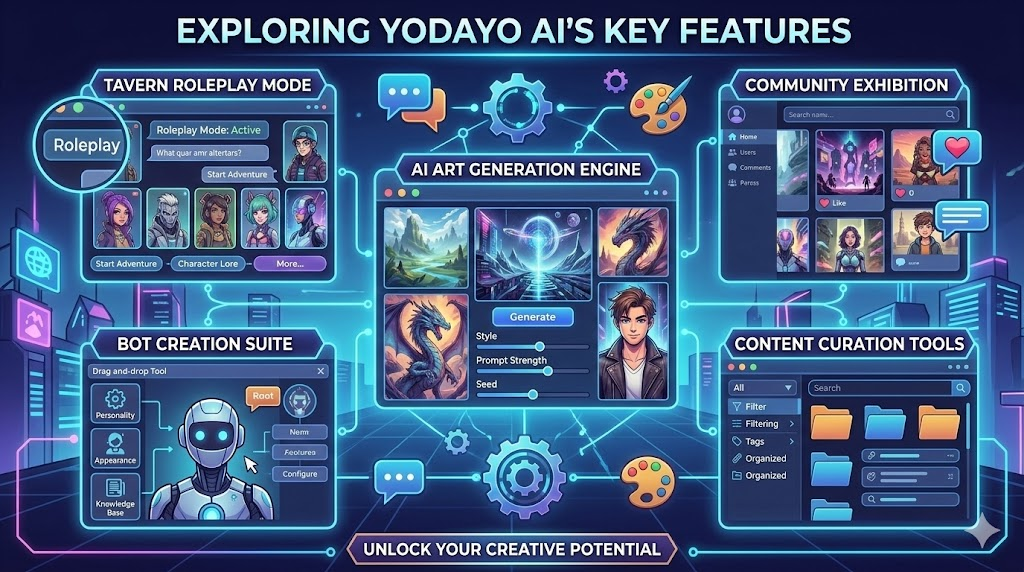
Exploring Yodayo AI’s Key Features
Yodayo AI isn’t a one-trick pony. It boasts a versatile toolkit designed to cater to a broad spectrum of creative needs. Let’s dive into some of its most powerful features.
Text Generation: Crafting Compelling Content
This is where Yodayo AI truly shines for many users. Need a blog post introduction, a product description, email copy, or even a poem? Yodayo AI can do it. You provide the topic, the desired tone (e.g., formal, friendly, humorous), and any specific keywords or information you want included, and the AI crafts the text for you. It can save you hours of writing, acting as a fantastic starting point or even a complete draft.
Prompt Engineering: The Art of Talking to AI
The secret sauce to getting the best results from any AI, including Yodayo AI, is effective prompting. Think of prompt engineering as learning the language of the AI. The more specific, clear, and detailed your instructions are, the better the output will be. Instead of saying “write about dogs,” try “write a 300-word blog post in a friendly and informative tone about the benefits of adopting rescue dogs, focusing on companionship and the positive impact on a dog’s life.” It’s about guiding the AI with precision.
Image Generation: Visualising Your Ideas
Beyond words, Yodayo AI can also bring visual concepts to life. Uploading an image and asking the AI to modify it, or describing a scene you envision from scratch, can yield stunning results. Want a cyberpunk cityscape at sunset? Or perhaps a whimsical illustration of a cat wearing a wizard hat? Describe it in detail, specify the art style (e.g., photorealistic, watercolour, anime), and watch Yodayo AI paint your imagination onto the digital canvas.
Style Transfer and Customization
Many AI image generators allow for incredible customisation. You might be able to influence the lighting, the camera angle, the colour palette, or even apply the style of a famous artist. This level of control means you’re not just getting a random image; you’re guiding the AI to produce something that aligns precisely with your aesthetic vision. It’s like having an art director at your fingertips.
Content Enhancement Tools
Beyond raw generation, Yodayo AI often includes features to refine and improve existing content. This could involve summarising lengthy articles, rephrasing sentences for clarity, checking grammar and spelling with advanced AI precision, or even expanding on brief ideas to create more detailed content. These tools are invaluable for polishing your work and ensuring it’s as impactful as possible.
Advanced Techniques for Power Users
Once you’ve mastered the basics, Yodayo AI offers pathways to even more sophisticated applications. It’s time to move beyond simple requests and truly integrate this powerful tool into your workflow.
Leveraging Yodayo AI for Specific Niches
The real power of Yodayo AI is its adaptability. Whether you’re in the world of digital marketing, creative writing, or even academic research, Yodayo AI can be tailored to your specific needs.
Marketing and Social Media Magic
For marketers, Yodayo AI can be a game-changer. Imagine needing a week’s worth of social media posts for a new product launch. You can prompt Yodayo AI to generate engaging captions, relevant hashtags, and even accompanying image ideas across various platforms, all tailored to your brand’s voice. It can help brainstorm ad copy variations, write compelling email newsletters, and even craft SEO-friendly meta descriptions for your website. It’s like having an entire marketing department working around the clock.
Storytelling and Creative Writing Assistance
For authors and storytellers, Yodayo AI can be an invaluable brainstorming partner. Stuck on a plot point? Need character descriptions? Want to generate dialogue that feels authentic? Yodayo AI can help. You can feed it your existing narrative and ask it to suggest plot twists, flesh out character backstories, or even write descriptive passages in a specific author’s style. It can assist in world-building, generate lore, and help overcome writer’s block by providing endless creative prompts and ideas.
Integrating Yodayo AI into Your Workflow
The most effective way to use Yodayo AI is not as a replacement for human creativity, but as an augmentation. Think about where AI can assist you most. Perhaps it’s generating initial drafts, overcoming creative blocks, or handling repetitive content tasks. You can use Yodayo AI to brainstorm ideas, create outlines, generate rough drafts, and then use your own expertise and creativity to refine, edit, and add that unique human touch. It’s about working smarter, not harder.
Tips and Tricks for Maximising Yodayo AI’s Output
Getting great results from Yodayo AI is an art, and like any art, it benefits from practice and a few well-kept secrets.
Iterative Refinement: The Key to Perfection
Don’t expect the first output to be perfect. Think of the AI’s response as a draft. If it’s not quite right, don’t just discard it. Refine your prompt and try again. If the generated text is too formal, ask it to rewrite it in a more casual tone. If an image isn’t quite the colour you wanted, specify the colour in your next prompt. This back-and-forth, this iterative process, is crucial for shaping the AI’s output to your exact specifications. It’s a conversation, and you’re leading it.
Ethical Considerations and Responsible Use
As with any powerful technology, it’s vital to use Yodayo AI responsibly and ethically. Be mindful of copyright when generating images, especially if you’re aiming for a specific artist’s style. Always fact-check any information generated by the AI, as it can sometimes produce inaccuracies or “hallucinate” information. Most importantly, be transparent about your use of AI-generated content where appropriate, especially in professional or academic settings. It’s about augmenting human capabilities, not deceiving others.
The Future of Yodayo AI and Generative Technology
The field of AI is evolving at breakneck speed. Tools like Yodayo AI are just the tip of the iceberg. We can expect future iterations to become even more sophisticated, capable of understanding nuance, emotion, and complex creative briefs with greater accuracy. Integration with other digital tools will likely become seamless, and the ability to generate multi-modal content (text, images, video, audio all from a single prompt) is on the horizon. The future of content creation is undeniably intertwined with AI.
Conclusion: Your Creative Journey Starts Now
Yodayo AI isn’t here to replace human creativity; it’s here to empower it. It’s a tool that can break down barriers, accelerate your processes, and help you explore creative avenues you might never have considered. Whether you’re a seasoned professional or just starting your creative journey, understanding how to use Yodayo AI effectively can unlock a world of possibilities. So, dive in, experiment, play, and discover how this incredible technology can help you bring your unique ideas to life. The only limit is your imagination, and with Yodayo AI, that limit just got a whole lot further away.
Frequently Asked Questions (FAQs)
- Is Yodayo AI free to use?
Yodayo AI often offers a free tier with certain usage limits, alongside premium subscription plans that unlock more advanced features and higher usage caps. It’s best to check their official website for the most current pricing and plan details. - Can I use Yodayo AI for commercial purposes?
Generally, yes, but it’s crucial to review Yodayo AI’s terms of service. Most platforms allow commercial use of generated content, but there might be specific guidelines or attribution requirements to follow, especially with free tiers. - How do I improve the quality of AI-generated images?
To improve image quality, be highly specific in your prompts. Include details about the style, lighting, camera angle, colours, and subject matter. Experiment with negative prompts (telling the AI what you don’t want) and iterate on your initial results by refining your prompt. - What if the AI generates something factually incorrect?
AI models, including Yodayo AI, can sometimes “hallucinate” or generate incorrect information. Always fact-check any critical information, especially for professional, academic, or sensitive content. Treat AI output as a draft that requires human review and verification. - Can Yodayo AI understand complex instructions?
Yes, Yodayo AI is designed to handle increasingly complex instructions, especially with advanced prompt engineering. Breaking down your request into clear, sequential steps and providing context can help the AI understand and execute more intricate tasks.
Pingback: What Is the AI Laura Model? A Game-Changer in AI Technology
Pingback: HeyGen AI Pricing: Every Plan, Real Costs & What You Actually Get (2026)
Pingback: OpenAI vs Anthropic Pentagon AI Contract: Two AI Giants, Two Very Different Bets
Pingback: How AI Outbound Calling Agents Boost Sales Efficiency: Unlocking Success